
WARNING, 2026: This is a very old post I wrote some time ago, style, content and views expressed in this post have likely changed in the interim, and while there's nothing Bad here, you should keep that in mind!
WARNING: This is a very technical post, moreso than some of you might be used to, if you wanna stick with it, feel free! But it will help to understand at least the basics of C++ before diving in.
Windows 8.1 is old news and has been for some time now. With the release of Windows 10 in 2015, Microsoft has basically abandoned what was once a great operating system. While it's UI was daunting to most, underneath there was a wealth of new technologies just waiting to be built upon.
One of these was the Windows Runtime which, at the time, was mainly focused on allowing developers of pretty much any background to write these new fangled Metro Modern apps. It had "language projections" for .NET, C++ and even JavaScript. If you knew any of these languages, you could write a modern Windows app. On top of that, they added loads of new APIs to do things like access the camera and microphone, transcode audio and video files, read and edit photos, access GPS and location services, and so on, in a clean, object oriented way. Cool, right!
Well yes, but actually no. Metro was a pretty big flop for Microsoft, unfortunately so if you ask me, and since Windows 10, they ditched it to focus on the Universal Windows Platform. Metro is no more. Kinda.
See UWP is pretty much just Metro++. Almost all the APIs are brought over from Windows 8.1 (with a few exceptions and deprecations), and the UI stack has been kept pretty similar, but focused more on the desktop user than the tablets Windows 8 favoured. And since then the API has evolved further, with each new version of Windows 10 adding some new APIs for developers to take advantage of. But beyond this, very little of the underlying platform has changed, APIs are called and defined in the same way, and can be written in the same way too. On an ABI level, WinRT is exactly the same between Windows 8.1 and 10. This'll come in handy later.
C++ and the Windows Runtime
C++ and WinRT have had a... shaky relationship. Because WinRT is in essence, a subset of COM, calling it's APIs from normal C++ has always been possible, but never very pretty. Microsoft released WRL (or the "Windows Runtime C++ Template Library"), a header library to make this "easier", but... well here's an example:
// Get the activation factory for the IUriRuntimeClass interface.
ComPtr<IUriRuntimeClassFactory> uriFactory;
HString uriHString;
ComPtr<IUriRuntimeClass> uri;
HString domainName;

HRESULT hr = GetActivationFactory(HStringReference(RuntimeClass_Windows_Foundation_Uri).Get(), &uriFactory);
if (FAILED(hr))
{
    // this must be duplicated for every "hr =" you see.
    return PrintError(__LINE__, hr);
}

// Create a string that represents a URI.
hr = uriHString.Set(L"http://www.microsoft.com");
// Create the IUriRuntimeClass object.
hr = uriFactory->CreateUri(uriHString.Get(), &uri);
// Get the domain part of the URI.
hr = uri->get_Domain(domainName.GetAddressOf());

// Print the domain name and return.
wprintf_s(L"Domain name: %s\n", domainName.GetRawBuffer(nullptr));
Yuck. But in essence, this is how WinRT works. Activation factories, HStrings and COM objects. The alternative was always to use C++/CX, or C++ with "Component Extensions". A non-standard set of extensions to C++11 which makes the whole thing much easier:
Windows::Foundation::Uri^ uri = ref new Windows::Foundation::Uri(L"http://www.microsoft.com");
std::wcout << uri->Domain->Begin() << "\n";
Muuuuch easier, but what's this ref new bullshit? And what's with the ^? These are all extensions, and honestly, also pretty yucky. But what if you want to use not-Visual C++? Maybe clang or mingw? How about C++ 17? Well, no can do. Until recently.
The birth of C++/WinRT.
While C++/CX worked, it was far from optimal. Its extensions caused a fair few problems, and while WRL also worked... yeah, I don't feel I need to say much more. Regardless, there had to be a better way. And it turns out there was. Kenny Kerr, a developer on the Windows team at Microsoft knew this, and with a little help, built C++/WinRT. A complete toolchain to write WinRT apps in pure, standard C++17.
winrt::Windows::Foundation::Uri uri{ L"http://www.microsoft.com" };
std::wcout << uri.Domain().c_str() << "\n";
Clean, easy, no stupid extensions, pure C++. And it's portable too! While not "officially supported", it's validated to compile on clang, and I don't see why it wouldn't work on mingw. But it does have one small "problem", it's part of the Windows SDK 1803+, so obviously there's no way to use it on Windows 8... is there? Yeah!
Once you install that SDK, you get the cppwinrt.exe command line tool, which is pretty simple:
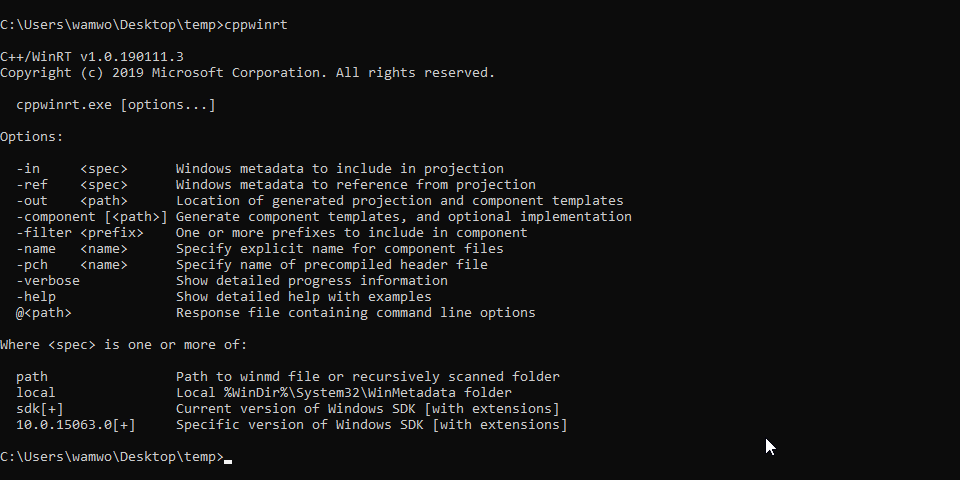
You can pass it a .winmd file containing metadata for any version of Windows 8+, so if you have the Windows 8.1 SDK installed, you can run:
> cppwinrt -in "C:\Program Files (x86)\Windows Kits\8.1\References\CommonConfiguration\Neutral\Windows.winmd"
And you'll get a set of header files for the Windows 8.1 SDK in a handy winrt folder! Let's make use of it, paste this into a file called "main.cpp", in the folder where you ran cppwinrt:
#pragma comment(lib,"windowsapp")

#include <iostream>
#include "winrt/Windows.Foundation.Collections.h"
#include "winrt/Windows.Web.Syndication.h"

using namespace winrt;
using namespace Windows::Foundation;
using namespace Windows::Web::Syndication;

int main()
{
    winrt::init_apartment();

    Uri rssFeedUri{ L"https://blogs.windows.com/feed" };
    SyndicationClient syndicationClient;
    SyndicationFeed syndicationFeed = syndicationClient.RetrieveFeedAsync(rssFeedUri).get();
    for (const SyndicationItem syndicationItem : syndicationFeed.Items())
    {
        winrt::hstring titleAsHstring = syndicationItem.Title().Text();
        std::wcout << titleAsHstring.c_str() << L"\n";
    }
}
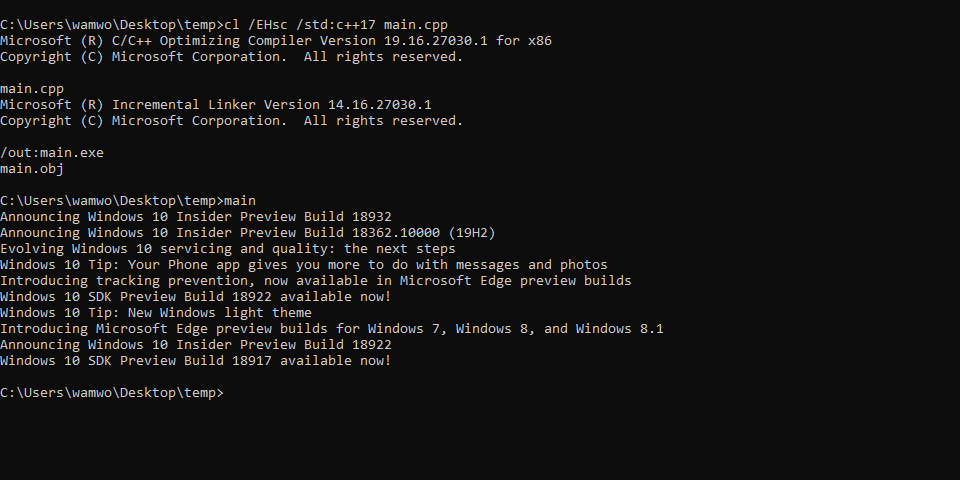
Then run
> cl /EHsc /std:c++17 main.cpp
And just like that, you're pulling data from an RSS feed!
But what about a real application, a Metro application, running natively on Windows 8.1... well in the next post, we'll move over to Windows 8.1, and start writing an actual Metro application using C++/winrt!